How to Play Your Spotify Playlist in GTA 6?

If you have been playing GTA 6 and enjoying the in-game radio stations, I am sure you will be wondering if you could play your own songs there. The short answer is no; however, we have found a way for you to play your playlist while playing GTA 6. Here is how to play your Spotify playlist in GTA 6.
How to Listen to Your Spotify Playlist in GTA 6
The first thing you need to make sure of is that both your PS5 and phone are connected to the same Wi-Fi network. The reason is that Spotify Connect uses the local network to establish a connection between devices.
When you are done connecting, follow the steps below:
Step 1: Download Spotify on Your PS5
Go to the PS5 PlayStation Store and search for Spotify and download it.
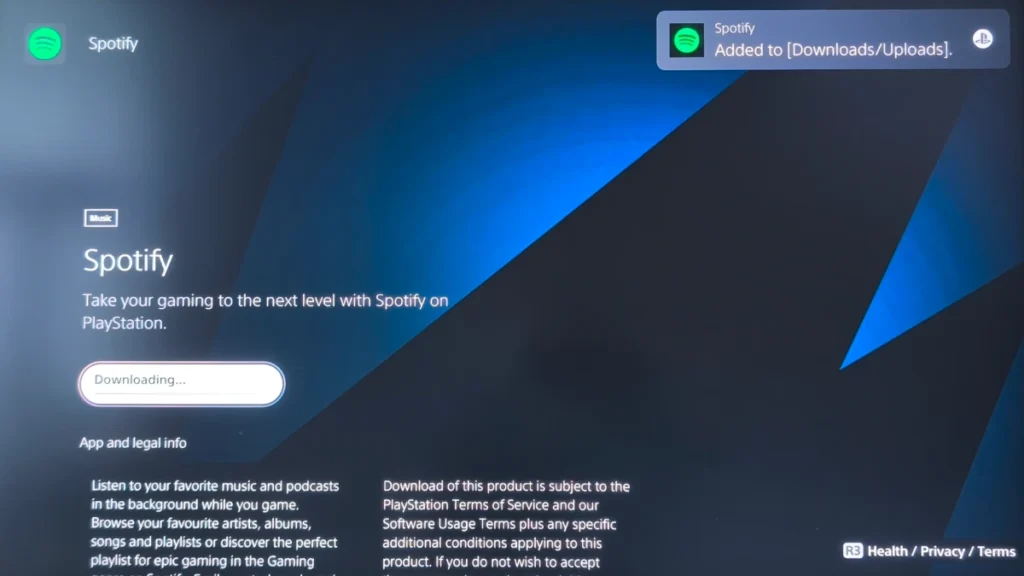
Step 2: Open Spotify on Your Phone and Start Playing
Once your download is complete, launch the Spotify app on your phone and log in to your account. After that, pick any song or playlist you want. Doing this will activate the session.
Step 3: Switch Playback to Your PS5
Now look at the bottom of the Spotify screen on your phone. You will see a small monitor and speaker icon in the bottom-left, tap it. This will open your Spotify Connect, which shows all available devices on your network.
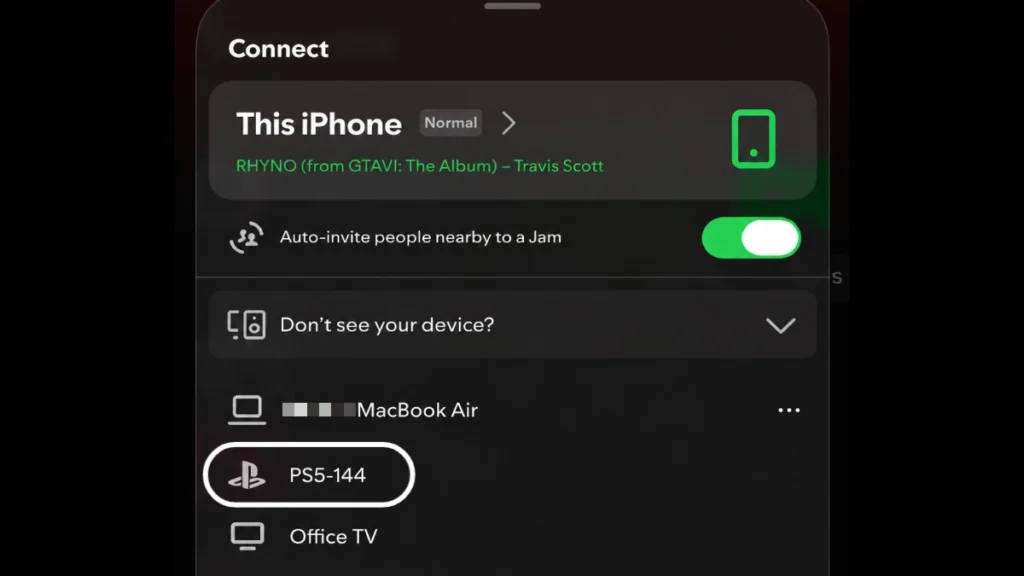
If you have already used the same Wi-Fi network, your PS5 will be on the list. Select it and Spotify will transfer playback to your console immediately.
Step 4: Launch GTA 6 and Keep Playing
Once your music is running on the PS5, go ahead and launch GTA 6. The music will keep playing in the background. You don’t need to keep the Spotify app open on your phone or on your console.
Your phone just works like a live remote, so you can pause, play, skip tracks, or pick playlists at any point without leaving the game.
What to Do If Your PS5 Isn’t Showing Up in Spotify Connect?
The most common error I faced while doing this process was that, after reaching step 3, at times my PS5 wouldn’t appear on the device list. So here is the fix:
- Before restarting Spotify or your device, re-check if both the phone and PS5 are on the same device.
- If the devices are on same Wi-Fi, however the fix didn’t work, try removing Spotify from multitasking and opening it again.
- If nothing works, then you can do a full restart of the console. This will usually clears the problem.
Can You Control Spotify From Inside GTA 6?
No, there is no way to control Spotify directly from the game. There is no in-game Spotify app builds into your phone in GTA 6. However, you can use the phone to manage the playlist.
The in-game radio stations will continue to exist as an option too, so if you want to switch back to Vice City’s stations at any point, just turn down your console’s media volume and let the in-game audio take over.
Related Posts


About GTA 6
- Released
- Upcoming (November 19, 2026)
- Developer
- Rockstar Games
- Publisher
- Rockstar Games
- Platforms
- PlayStation 5 and Xbox Series X/S
- Genres
- Action-adventure
- Rating
- M (17+)